Qu’est-ce que CarPlay sans fil ?
BMW a été le premier constructeur automobile à mettre en œuvre la prise en charge de CarPlay sans fil, et Volkswagen travaille également sur des solutions CarPlay sans fil et a lancé la fonctionnalité en Europe.
Mercedes-Benz a ajouté la prise en charge de CarPlay sans fil à son système d’infodivertissement MBUX, qui a fait ses débuts sur les modèles de la Classe A 2019, et Mitsubishi a commencé à prendre en charge CarPlay sans fil sur les modèles 2022.
Ford ajoute des fonctionnalités CarPlay sans fil à certains de ses véhicules 2020 équipés du système d’infodivertissement SYNC 4, comme le F-150 2021, et la nouvelle plateforme Uconnect 5 de Fiat Chrysler prend en charge la connectivité CarPlay sans fil. GM ajoute également la fonction CarPlay sans fil à certains véhicules de 2021, et Hyundai et Honda adoptent CarPlay dans l’Accord et le Santa Fe de 2021. De plus en plus de constructeurs automobiles adoptent CarPlay sans fil et, à l’avenir, il pourrait être plus courant que la version câblée.
pourquoi avez-vous besoin de carplay sans fil ?
Depuis IOS 9, Apple prend en charge les implémentations CarPlay sans fil. Presque toutes les configurations CarPlay exigent qu’un iPhone soit branché directement sur le système du tableau de bord pour se connecter, mais CarPlay sans fil élimine la nécessité d’un câble Lightning, permettant à un iPhone de se connecter sans fil à un système embarqué.
Si vous avez la chance d’avoir un système CarPlay sans fil dans votre véhicule, ou si vous avez récemment acheté un dongle CarPlay sans fil, nous allons vous expliquer comment l’activer.
Comment activer CarPlay sans fil sur votre appareil iOS ?
1. Accédez à l’application Réglages.
2. Sélectionnez Paramètres généraux.
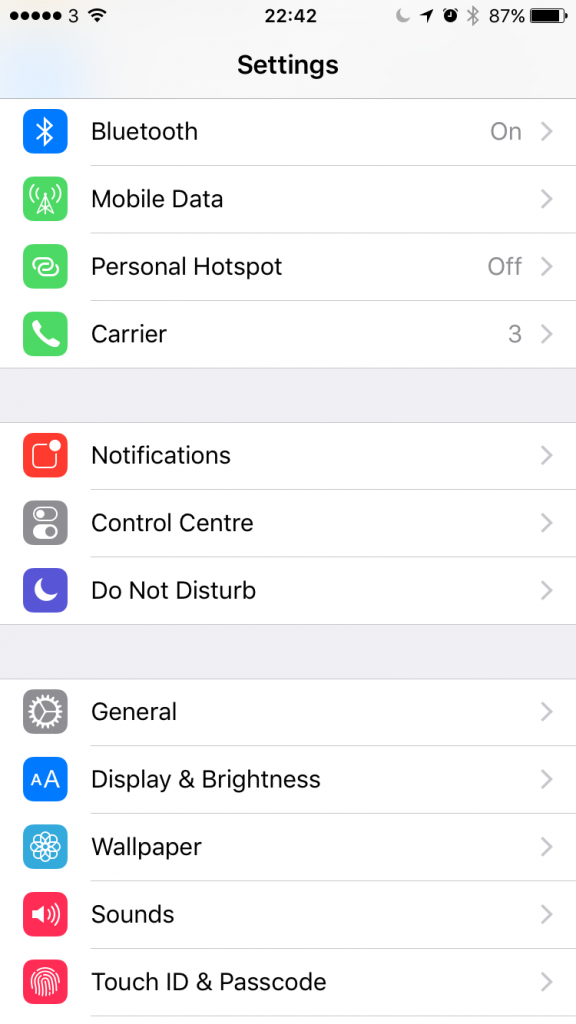
3. Sélectionnez Paramètres ‘CarPlay’.
4. Dans l’écran des paramètres CarPlay, si le Bluetooth est désactivé, il vous sera demandé de l’activer pour « activer CarPlay sans fil ».
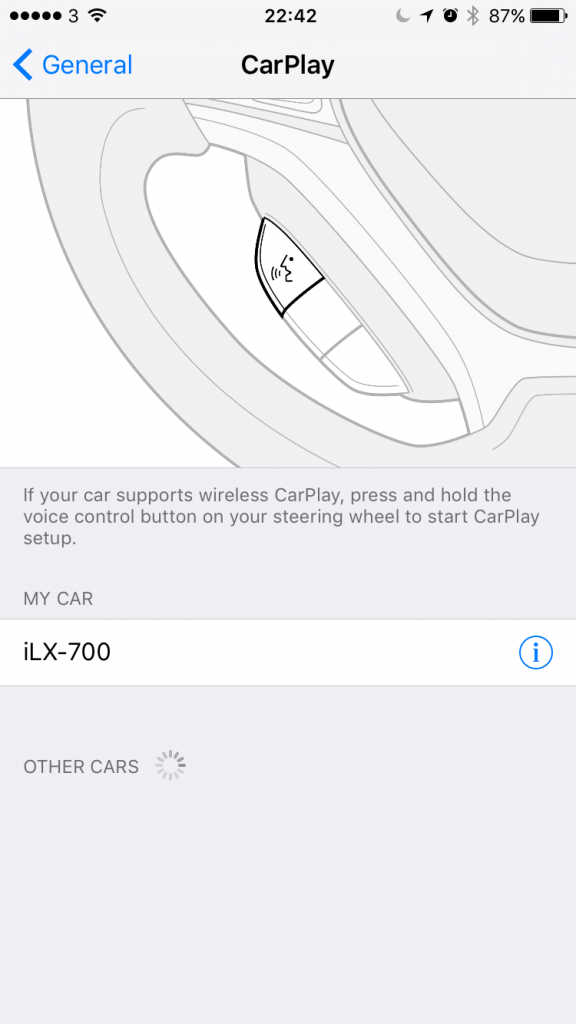
5. Lorsque la fonction CarPlay sans fil de votre autoradio est activée, maintenez enfoncé le bouton vocal sur votre volant ou sélectionnez l’option dans le menu de votre autoradio pour lancer le processus de couplage sans fil entre votre appareil et le système stéréo.
What Wireless Apple CarPlay Systems Are There?
There Are Many Wireless CarPlay Systems Available Now. It Has Taken A Few Years For The Technology To Settle And Become Readily Available, But You Now Have A Few Options Open To You When Looking For Getting Wireless CarPlay In Your Vehicle.
Option 1: Buy A New Vehicle With Wireless Apple CarPlay Option Installed, However It Will Be The Most Expensive Choice.
1.No need to installation
2.don't need to worry about the carplay compatity
it is very costy
Option 2: Upgrade Your Existing Car System With A Newer OEM Receiver That Features Wireless CarPlay. This Usually Involves Buying A Newer System Second-Hand Off EBay And Having It Professionally Fitted And Mapped To Your Older Vehicle.
it might be cheaper than buying a new car or a new aftermarket head unit
you need to have deep knowledge to select suitable carplay
Option 3: Upgrade Your Existing Car System With An Aftermarket Receiver With Wireless CarPlay Support. This Involves Selecting The Right Receiver For Your Vehicle, Then Having It Fitted Either By A Professional Installer (Recommended) Or Fitting It Yourself Using A Number Of Tutorials Online.
A Professional Installer Will Select The Right Components To Install The New CarPlay Receiver In Your Vehicle And Save You The Headache Of Compatibility Of Components Needed, And Reduce The Many Install Issues That Can Arise If You Have Not Properly Configured Or Setup The Receiver Correctly.
1.you don't need to install yourself 2.don't need to worry about the carplay compatity
it might be costy
Option 4: Buy A Wireless CarPlay Dongle For Your Existing Wired Apple CarPlay System.
If You Have A Wired CarPlay System Or Receiver Already Installed In Your Car, You Don’t Have To Replace It Entirely, You Can Just Buy A Simple USB Wireless Dongle And Transform Your CarPlay Head Unit Into A Wireless One.
1. it just needs to plug and play, no need to installation
2.it is the cheapest way to get a wireless carplay
some cars might not be supported by the carplay dongle
Option 5: If You Don’t Have CarPlay Already In Your Car, You Can Buy The All-In-One CarPlay Solution – Wireless Apple CarPlay Dashboard Console 2.0
This Portable Wireless CarPlay Does not Require High-Cost Professional Installation, And Can Fit In Any Cars. If You Do Not Have A Fancy New Stereo With CarPlay Or You Have An Old Car, This Is The Easiest Way To Get Apple CarPlay In Your Car. This Apple CarPlay Dashboard Console Is A Standalone Display That You Fix To Your Car Dashboard Or Windscreen. You Can Connect Your Phone With This CarPlay Console Easily Via Bluetooth Or Wi-Fi.
1. it just need to plug and play, no need to installation
2.it is the cheapest way to get a wireless carplay
havn't seen any negative feedback yet
How to select products at our store?
If your car has a factory CarPlay and want to convert your wired carplay to wireless, You can choose carlinkit new 3.0 U2W Plus
If your vehicle is not compatible with carlinkit 3.0, you can try the MMB Carplay. it is Not only a wireless carplay dongle but it also has its own Android car system, which means You Can Run Any Android 11.0 Compatible App From The Google Play Store On Your CarPlay Display
If your car doesn’t have a display, you could try the Wireless Apple CarPlay Dashboard Console 2.0,This Is The Easiest Way To Get Apple CarPlay In Your Car. This Apple CarPlay Dashboard Console Is A Standalone Display That You Fix To Your Car Dashboard Or Windscreen. You Can Connect Your Phone With This CarPlay Console Easily Via Bluetooth Or Wi-Fi.